> ## Documentation Index
> Fetch the complete documentation index at: https://help.elationhealth.com/llms.txt
> Use this file to discover all available pages before exploring further.
# How Elation Billing Corresponds to the HCFA 1500
> Reference guide mapping Elation Billing fields to HCFA 1500 form boxes
This article provides a reference guide showing how Elation Billing fields correspond to the HCFA/CMS 1500 claim form boxes.
## Overview
The CMS-1500 (formerly HCFA-1500) is the standard claim form used for billing professional services. This guide maps each box on the form to its corresponding location in Elation Billing.
## Visual Guide
Click the image to expand it:
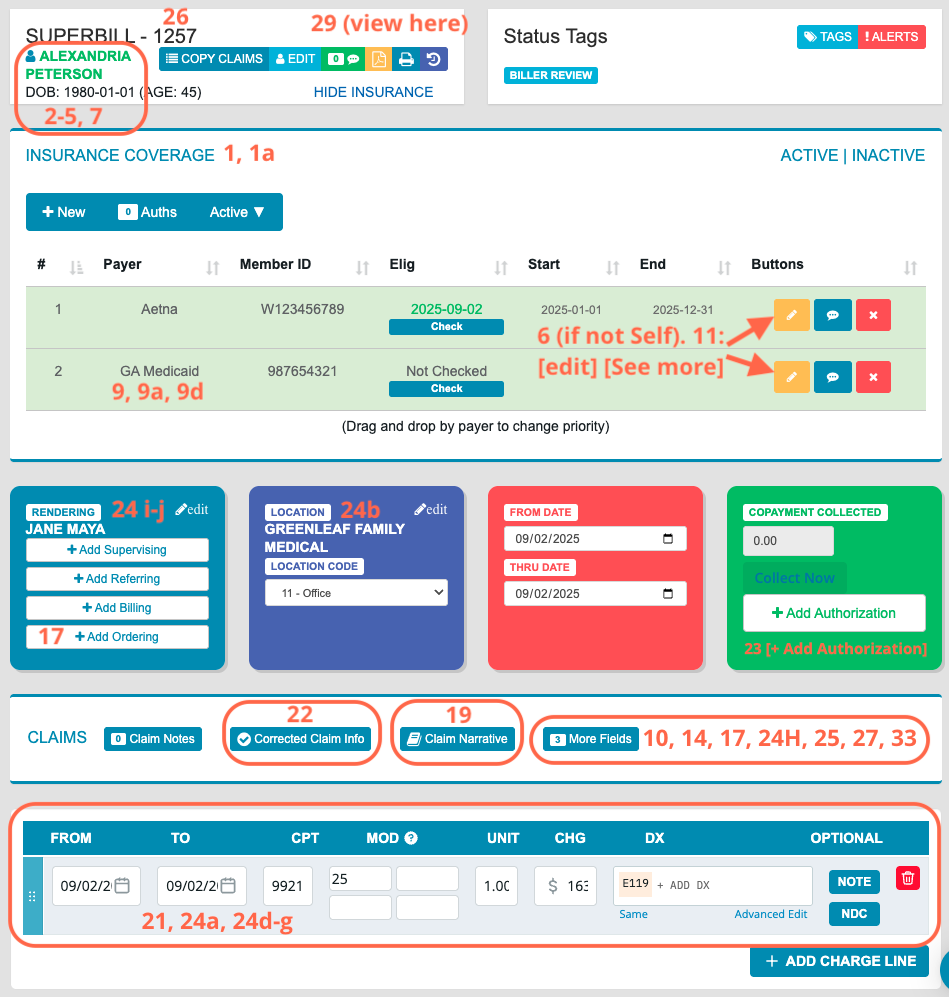 ## Field Reference Table
| Box # | Title | Location in Elation Billing |
| - | - | - |
| 1 | Insurance Type, Insured's ID | Insurance Coverage |
| 1a | Insured's ID Number | Insurance Coverage |
| 2 | Patient's Name | Patient Demographics |
| 3 | Patient's Birth Date | Patient Demographics |
| 4 | Insured's Name | Insurance Coverage → See More |
| 5 | Patient Address | Patient Demographics |
| 6 | Patient Relationship to Insured | Insurance Coverage → See More |
| 7 | Insured's Address, Telephone | Patient Demographics |
| 9 | Other Insured's Name | Secondary Insurance |
| 9a | Other Insured's Policy/Group Number | Secondary Insurance |
| 9d | Other Insurance Plan Name | Secondary Insurance |
| 10 | Condition Related To | Superbill → More Fields |
| 11 | Insured's Policy Group | Insurance Coverage |
| 12 | Information Release Signature | Signature on File |
| 13 | Payment Authorization Signature | Signature on File |
| 14 | Date of Illness/Injury/Pregnancy | Superbill → More Fields |
| 17 | Referring Provider Name | Superbill → Add Referring |
| 17a | Non-NPI ID | Superbill → More Fields |
| 17b | Referring NPI | NPI on File |
| 18 | Hospitalization Dates (Admit Date only) | Superbill → Location Code 21, 22, or 31 |
| 19 | Additional Claim Information | Superbill → Claim Narrative |
| 21 | Diagnoses Codes | Claim Lines (aggregated) |
| 22 | Resubmission/Frequency Code | Superbill → Corrected Claim Info |
| 23 | Prior Authorization Number | Superbill → + Add Authorization |
| 24a | DOS | Claim Line(s) |
| 24b | POS | Location |
| 24d | CPTs, Modifiers | Claim Line(s) |
| 24e | DX Pointer | Claim Line(s) |
| 24f | Charges | Claim Line(s) |
| 24g | Days/Units | Claim Line(s) |
| 24h | EPSDT Family Plan | Charge Line Note or More Fields |
| 24i, 24j | Rendering Provider ID | Practice Settings → Providers |
| 25 | Federal Tax ID Number | Practice Settings → Practice Info |
| 26 | Patient's Account Number | Superbill ID + Practice indicator |
| 27 | Accept Assignment | Superbill → More Fields → Box 27 |
| 28 | Total Charge | Total of Charges |
| 29 | Amount Paid | Pulled from previous Payments |
| 31 | Signature of Physician | Name of Rendering, Date Submitted |
| 32 | Service Facility Location | Practice Settings → Service Locations |
| 33 | Billing Provider Info | Practice Settings → Practice Info |
Box 18 only supports an Admit Date. The Discharge Date field in Box 18 is not supported by Elation Billing at this time.
**Exception:** If a payer has a Special Payer Rule configured (**Practice Settings → Insurance** → the payer's NPI/Tax ID rules), that rule's NPI overrides the entity's default NPI in Box 33 for claims to that payer. See [Practice Settings Setup and Overview](/articles/practice-settings-setup-and-overview#add-a-payer) to review or update Special Payer Rules.
## Related Articles
* [Filing a Claim](/articles/filing-a-claim)
* [How Can I Access and Print the CMS-1500 Claim Form](/articles/how-can-i-access-and-print-the-cms-1500-claim-form-in-elation-billing)
* [Practice Settings Setup and Overview](/articles/practice-settings-setup-and-overview)
## Field Reference Table
| Box # | Title | Location in Elation Billing |
| - | - | - |
| 1 | Insurance Type, Insured's ID | Insurance Coverage |
| 1a | Insured's ID Number | Insurance Coverage |
| 2 | Patient's Name | Patient Demographics |
| 3 | Patient's Birth Date | Patient Demographics |
| 4 | Insured's Name | Insurance Coverage → See More |
| 5 | Patient Address | Patient Demographics |
| 6 | Patient Relationship to Insured | Insurance Coverage → See More |
| 7 | Insured's Address, Telephone | Patient Demographics |
| 9 | Other Insured's Name | Secondary Insurance |
| 9a | Other Insured's Policy/Group Number | Secondary Insurance |
| 9d | Other Insurance Plan Name | Secondary Insurance |
| 10 | Condition Related To | Superbill → More Fields |
| 11 | Insured's Policy Group | Insurance Coverage |
| 12 | Information Release Signature | Signature on File |
| 13 | Payment Authorization Signature | Signature on File |
| 14 | Date of Illness/Injury/Pregnancy | Superbill → More Fields |
| 17 | Referring Provider Name | Superbill → Add Referring |
| 17a | Non-NPI ID | Superbill → More Fields |
| 17b | Referring NPI | NPI on File |
| 18 | Hospitalization Dates (Admit Date only) | Superbill → Location Code 21, 22, or 31 |
| 19 | Additional Claim Information | Superbill → Claim Narrative |
| 21 | Diagnoses Codes | Claim Lines (aggregated) |
| 22 | Resubmission/Frequency Code | Superbill → Corrected Claim Info |
| 23 | Prior Authorization Number | Superbill → + Add Authorization |
| 24a | DOS | Claim Line(s) |
| 24b | POS | Location |
| 24d | CPTs, Modifiers | Claim Line(s) |
| 24e | DX Pointer | Claim Line(s) |
| 24f | Charges | Claim Line(s) |
| 24g | Days/Units | Claim Line(s) |
| 24h | EPSDT Family Plan | Charge Line Note or More Fields |
| 24i, 24j | Rendering Provider ID | Practice Settings → Providers |
| 25 | Federal Tax ID Number | Practice Settings → Practice Info |
| 26 | Patient's Account Number | Superbill ID + Practice indicator |
| 27 | Accept Assignment | Superbill → More Fields → Box 27 |
| 28 | Total Charge | Total of Charges |
| 29 | Amount Paid | Pulled from previous Payments |
| 31 | Signature of Physician | Name of Rendering, Date Submitted |
| 32 | Service Facility Location | Practice Settings → Service Locations |
| 33 | Billing Provider Info | Practice Settings → Practice Info |
Box 18 only supports an Admit Date. The Discharge Date field in Box 18 is not supported by Elation Billing at this time.
**Exception:** If a payer has a Special Payer Rule configured (**Practice Settings → Insurance** → the payer's NPI/Tax ID rules), that rule's NPI overrides the entity's default NPI in Box 33 for claims to that payer. See [Practice Settings Setup and Overview](/articles/practice-settings-setup-and-overview#add-a-payer) to review or update Special Payer Rules.
## Related Articles
* [Filing a Claim](/articles/filing-a-claim)
* [How Can I Access and Print the CMS-1500 Claim Form](/articles/how-can-i-access-and-print-the-cms-1500-claim-form-in-elation-billing)
* [Practice Settings Setup and Overview](/articles/practice-settings-setup-and-overview)